

Description
Light Theme for SwiftDial Browser
Overview
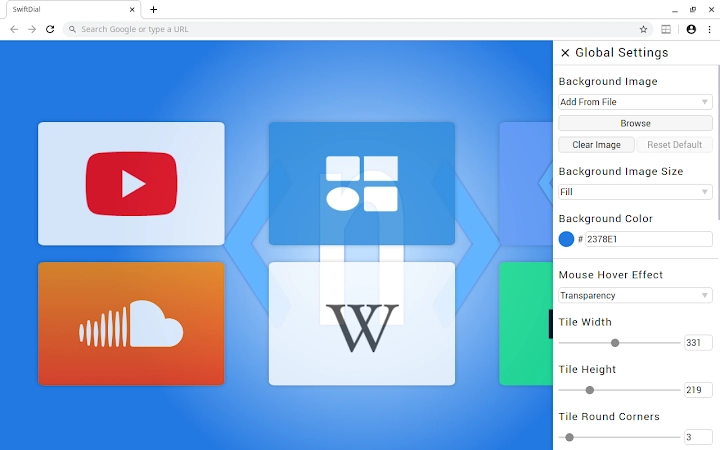
SwiftDial Light is a browser theme designed to mirror the aesthetic of the SwiftDial homepage’s Light Theme. This lightweight extension enhances the new tab page with a clean, modern interface that prioritizes visual clarity and usability. It is intended for users who value a minimalist, distraction-free browsing experience while maintaining quick access to frequently visited websites. The theme integrates seamlessly with the SwiftDial ecosystem, offering a consistent look across devices and platforms. It is particularly suited for individuals who use the SwiftDial speed dial functionality and wish to align their browser’s appearance with the chosen theme. Real-world usage includes personal browsing, remote work setups, and digital workspace customization. The developer, SwiftDial, has focused on delivering a cohesive user experience through visual harmony and intuitive design. No additional system requirements were specified beyond the supported operating systems.
Key Features & Capabilities
- Light Theme Aesthetic – Applies a clean, bright color scheme that reduces eye strain during daytime browsing and enhances readability.
- Seamless Integration with SwiftDial – Ensures visual consistency when using SwiftDial’s speed dial or new tab features.
- Minimalist Design – Focuses on functionality without clutter, offering a distraction-free interface for quick navigation.
- Customization via SwiftDial – Allows users to manage and adjust their speed dial layout through the main SwiftDial application.
- Cross-Platform Availability – Functions across Windows, Mac, and Linux systems with consistent appearance and behavior.
Users benefit from a unified visual language when switching between devices. The theme is ideal for those who use SwiftDial as their primary new tab experience and want a polished, modern look. It supports efficient workflow by reducing cognitive load through clear visual hierarchy and intuitive layout. Since the theme relies on the underlying SwiftDial functionality, all feature enhancements are managed through the main extension, not within the theme itself.
User Interface, Workflow & Performance
The user interface of SwiftDial Light is centered around a grid-based layout, displaying user-defined shortcuts in a visually balanced format. Navigation is direct and intuitive, with no additional layers or menus required to access favorite sites. The design emphasizes simplicity, with minimal visual elements that do not interfere with content visibility. Workflow efficiency is maintained through immediate access to saved links, reducing time spent searching or typing URLs. The theme does not introduce new interactive elements beyond what is already provided by SwiftDial. Performance observations are based on general software behavior patterns. The developer did not specify resource usage details, but the 2.3 MB file size suggests a lightweight footprint. Stability is expected to align with the main SwiftDial extension’s track record, though no formal benchmarks were provided.
Compatibility & System Requirements
SwiftDial Light is compatible with Windows, Mac, and Linux operating systems. It is designed to work with the Chrome browser, as it is distributed through the Chrome Web Store. The extension has a file size of 2.3 MB, which is typical for browser themes of this nature. The software version is 1.0.1, released on May 15, 2024. Exact system requirements were not listed. Compatibility information is limited to the platforms and browser environment specified. Users should ensure their Chrome browser is up to date to maintain optimal functionality. No hardware-specific requirements were mentioned.
Pros and Cons
Pros
- Provides a clean, modern look aligned with SwiftDial’s Light Theme
- Lightweight with minimal impact on browser performance
- Seamless integration with the SwiftDial speed dial system
- Available on Windows, Mac, and Linux platforms
- Free to use with no hidden costs
Cons
- Dependent on the SwiftDial extension for full functionality
- No standalone customization options within the theme itself
- Performance data not publicly disclosed
- Limited to Chrome browser environment
- Updates are managed through the main extension, not independently
FAQ Section
Is SwiftDial Light compatible with all browsers?
SwiftDial Light is designed specifically for the Chrome browser and is distributed via the Chrome Web Store. Compatibility with other browsers is not confirmed.
Can I use this theme without the SwiftDial extension?
No. The theme relies on the SwiftDial extension to function. It does not operate independently and requires the main extension to display speed dial content.
Is the theme secure to install?
As a Chrome Web Store extension developed by SwiftDial, it undergoes Google’s security review process. However, users should only install extensions from official sources.
How do I update the theme?
Updates are managed automatically through the Chrome browser’s extension system when the main SwiftDial extension is updated.
Does the theme work offline?
Yes. Once installed, the theme functions without an internet connection, as it only requires the locally stored data from the SwiftDial extension.
Final Thoughts
SwiftDial Light delivers a polished, minimalist aesthetic that enhances the browsing experience for users invested in the SwiftDial ecosystem. Its clean interface and consistent design make it a strong choice for those seeking a distraction-free new tab page with a modern touch. While it lacks standalone customization, its integration with the main extension ensures a seamless and reliable experience. The free model, cross-platform support, and lightweight nature further improve its appeal. For users who already use SwiftDial, this theme is a natural enhancement. Download SwiftDial Light now to elevate your browsing interface with a sleek, modern look.
Guides & Tutorials for SwiftDial Light Theme for Chrome
How to install SwiftDial Light Theme for Chrome
- Click the Preview / Download button above.
- Once redirected, accept the terms and click Install.
- Wait for the SwiftDial Light Theme for Chrome download to finish on your device.
How to use SwiftDial Light Theme for Chrome
This software is primarily used for its core features described above. Open the app after installation to explore its capabilities.
User Reviews for SwiftDial Light Theme for Chrome 0
No reviews found





